
Designing a Reliable Kubernetes Deployment with GitOps
Deploying an application to a Kubernetes cluster is not just about building a container image and running it. A reliable deployment workflow must define how artifacts are built, where they are stored, which version is selected for release, and how the desired configuration is applied to the cluster.
As these responsibilities grow, maintaining a clear relationship between application code, image versions, and deployment manifests becomes increasingly important.
Without an explicit workflow, deployments can become difficult to trace, inconsistent, and teams may lose visibility into which application version is actually running.
The problem becomes clearer when these responsibilities are not explicitly connected:
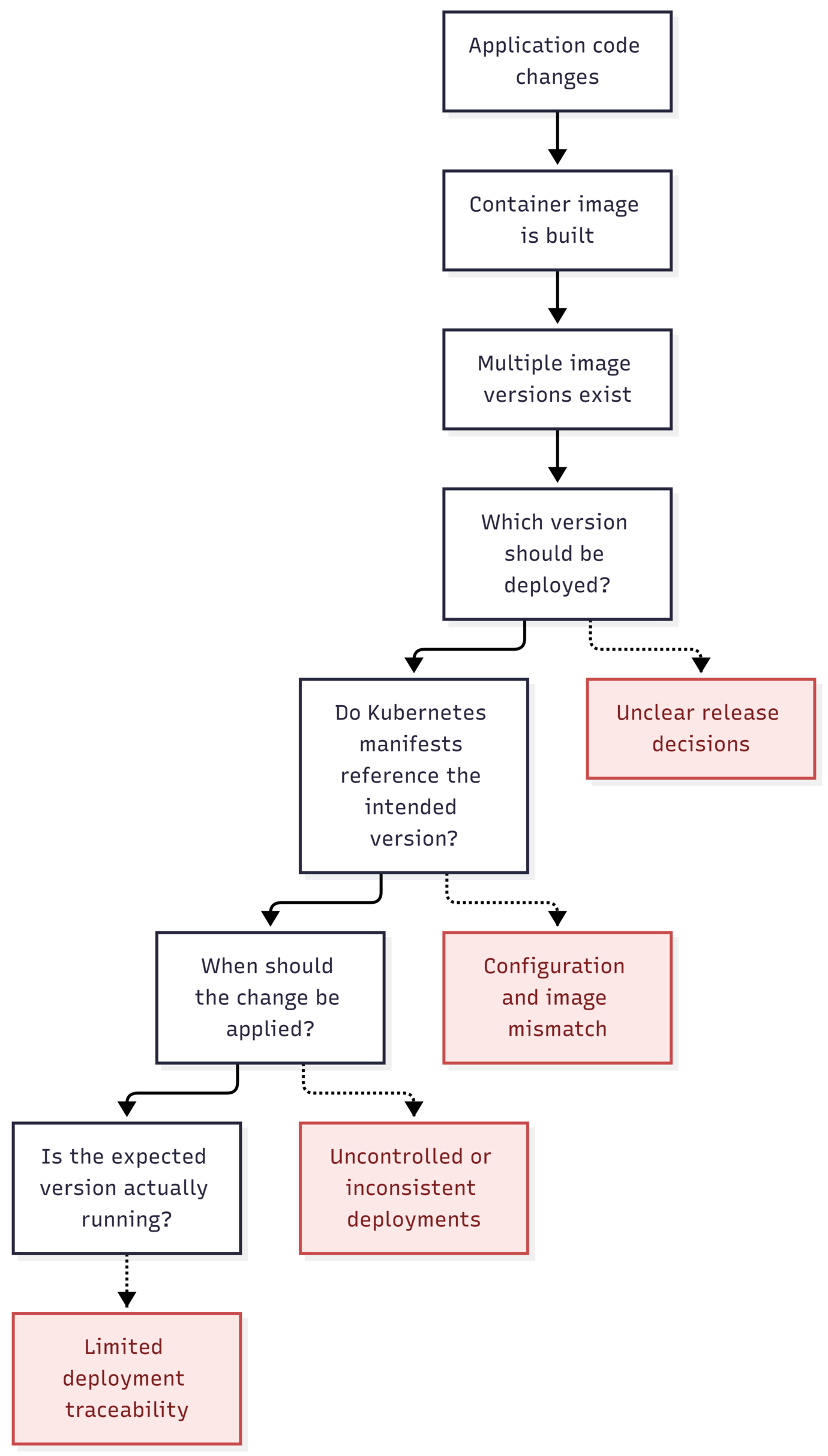
These challenges motivate a workflow that makes image versions, deployment configuration, and release decisions explicit.
This is where Continuous Integration (CI) and GitOps complement each other: CI automates building and publishing container images, while GitOps manages the desired deployment state through version-controlled configuration.
The code snippets in this article focus on the important parts of the implementation. For the complete configuration you can find the source code in the repository below.
What We Are Building
In this project, we build a deployment that establish a workflow in which application artifacts are versioned, deployment changes are traceable, and Kubernetes continuously converges toward an explicitly defined desired state.
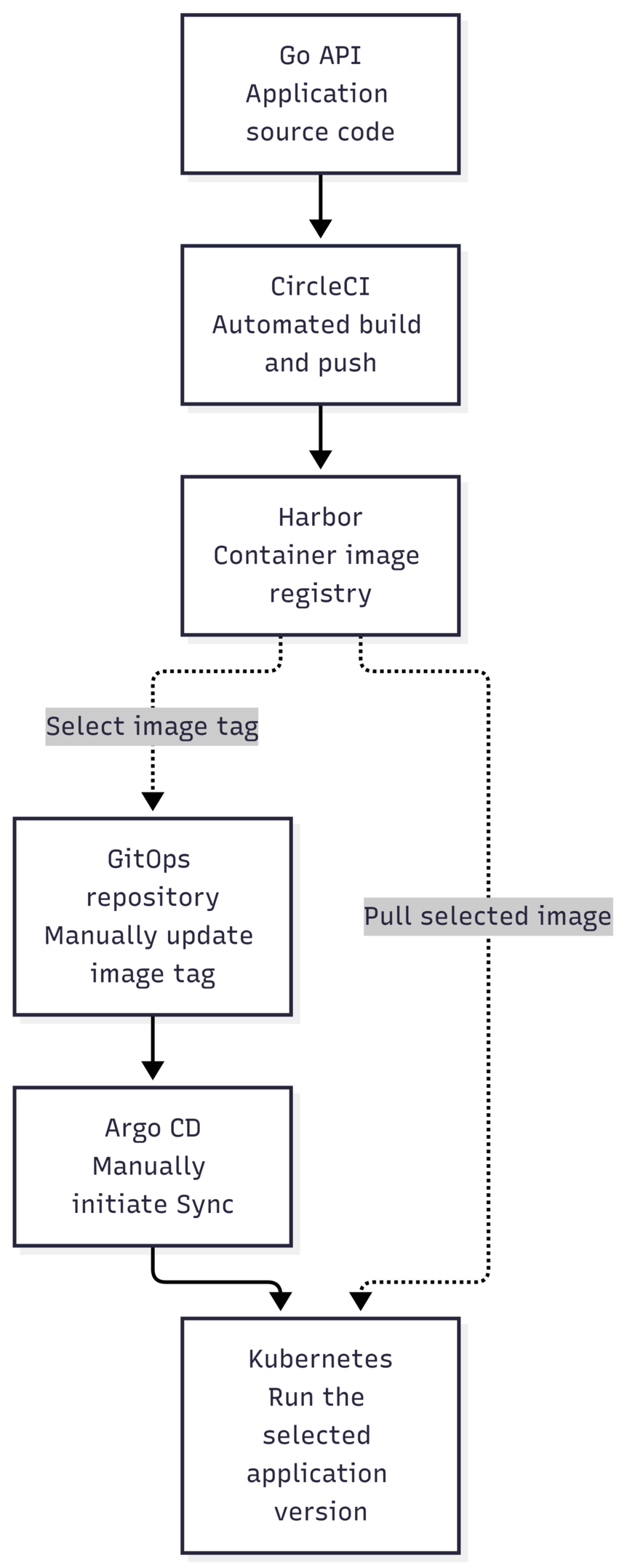
This project uses two repositories with separate responsibilities:
Application repository: Go API source code, Dockerfile, and CircleCI configuration.
GitOps repository: Helm chart and production values that declare the desired Kubernetes configuration.
The supporting components are:
CircleCI builds the application image and pushes it to Harbor.
Harbor stores versioned container images.
Helm templates the Kubernetes resources from chart and values.
Argo CD compares the GitOps configuration with the cluster and synchronizes it.
Kubernetes schedules and runs the workload.
The pipeline automates image delivery, while release promotion remains explicit: a person updates the GitOps image tag to deliberately select the version to deploy, then manually starts synchronization in Argo CD to control when that version is applied to the cluster.
Automatically deploying every published image is not always desirable because a successful build does not necessarily mean the image is ready for release. New builds may still require validation, review, or coordination with the target environment.
Separating image publishing from deployment provides clear release checkpoints and reduces the risk of unreviewed changes reaching users.
Project Architecture
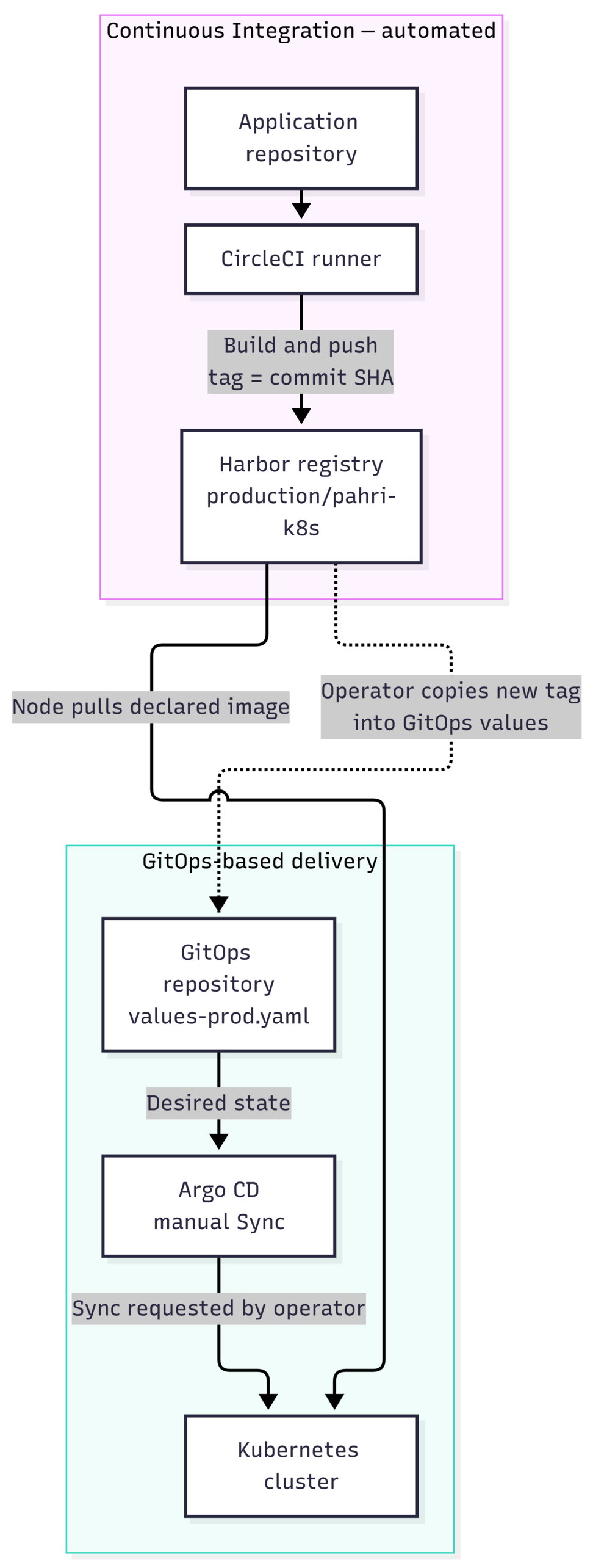
Artifact delivery and deployment
The CI path produces an image. The deployment path declares which image should run and applies that desired state to Kubernetes. The GitOps repository is the handoff between them.
The dashed connection is not an automated pipeline step. CircleCI does not commit to the GitOps repository. After an image is published, the image tag is updated manually in environments/production/values-prod.yaml. Argo CD then shows the configuration difference; a user manually selects Sync to apply it.
Application repository
Repository: https://github.com/muhammadyulasfipahrizal/circle
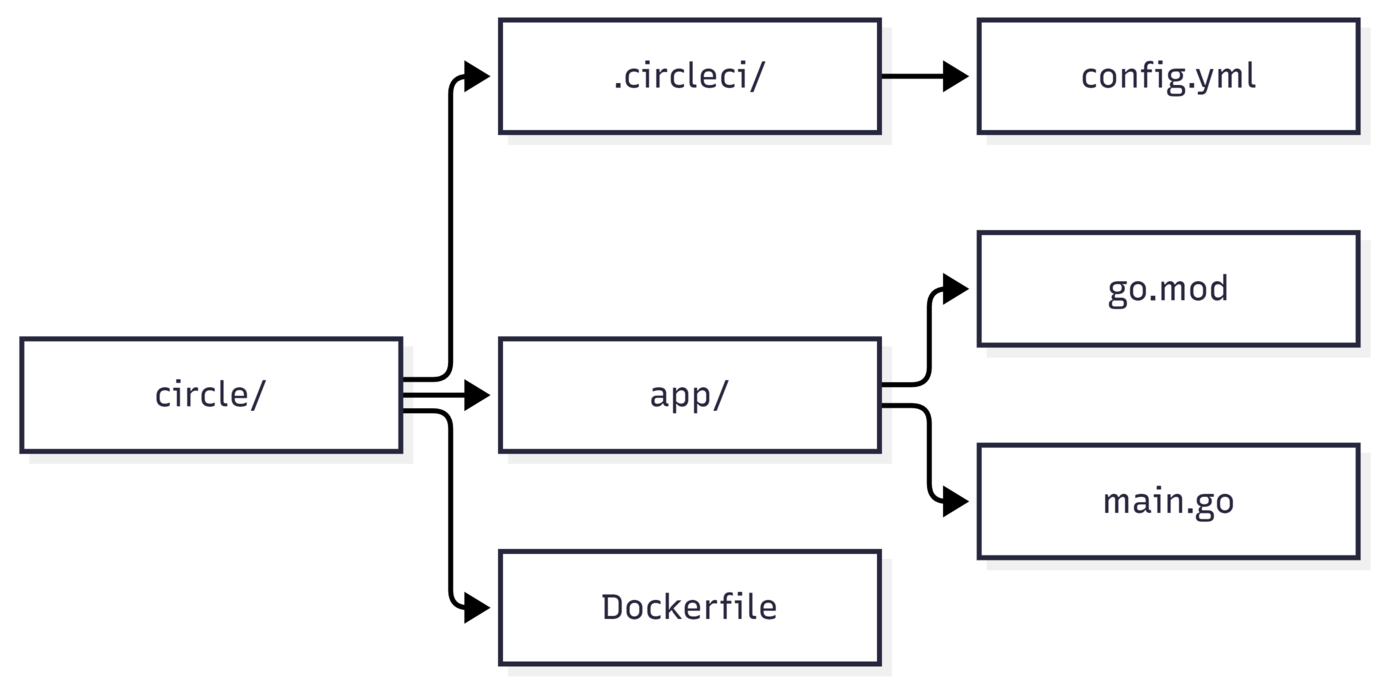
| File | Responsibility |
|---|---|
app/main.go |
Implements the Go HTTP API, including /health. |
app/go.mod |
Defines the Go module and dependencies. |
Dockerfile |
Builds the binary and packages it into a minimal runtime image. |
.circleci/config.yml |
Defines the CircleCI build-and-push job. |
GitOps repository
Repository: https://github.com/muhammadyulasfipahrizal/gitops
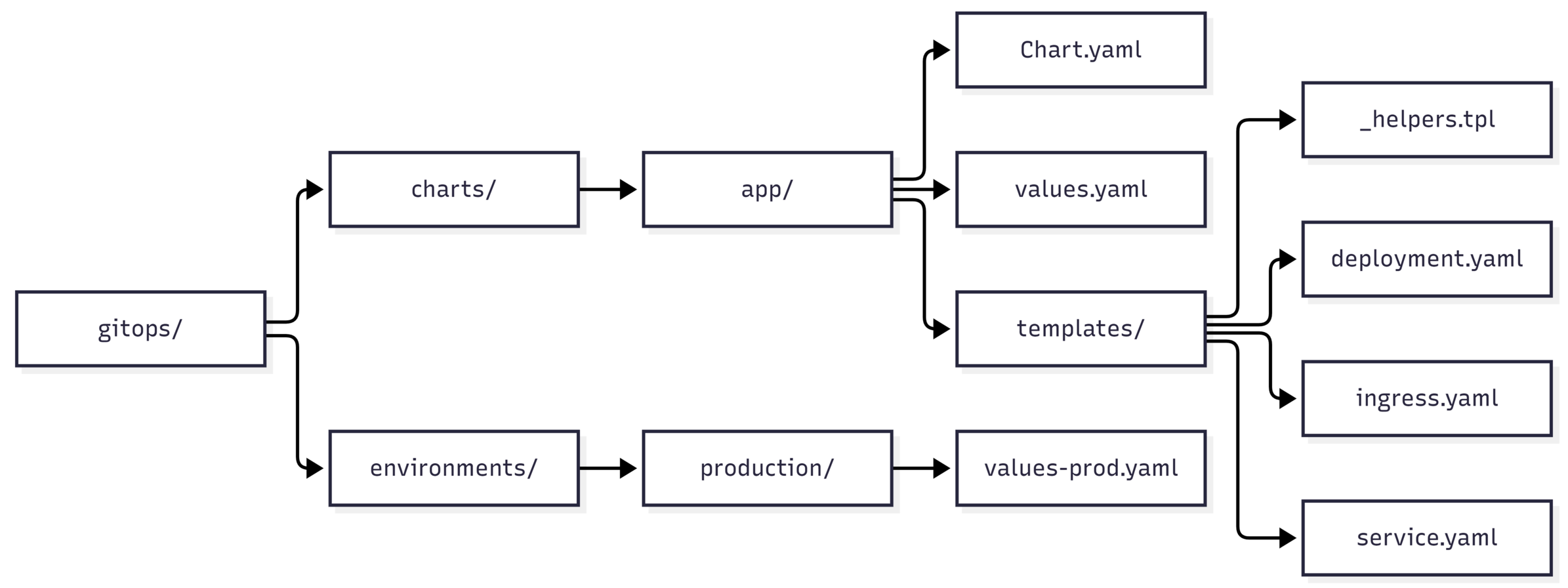
| File | Responsibility |
|---|---|
charts/app/Chart.yaml |
Defines Helm chart metadata. |
charts/app/values.yaml |
Provides default chart values. |
charts/app/templates/_helpers.tpl |
Defines reusable template helpers. |
charts/app/templates/deployment.yaml |
Defines the application Deployment. |
charts/app/templates/service.yaml |
Defines the Service. |
charts/app/templates/ingress.yaml |
Defines the Ingress resource. |
environments/production/values-prod.yaml |
Supplies production-specific overrides, including image tag, replica count, service port, and resources. |
The chart defines reusable resource templates; the production values supply the settings for this deployment. The separation makes it possible to review a release by examining a small Git diff instead of changing Kubernetes resources directly.
Implementation
The Go application exposes a /health endpoint so that we can check whether it responds after deployment.
The Dockerfile uses a multi-stage build: the first stage compiles the Go application, and the final image contains the binary rather than the Go toolchain.
FROM golang:1.22-alpine AS builder

WORKDIR /src

COPY app/go.mod ./
RUN go mod download

COPY app/ .

RUN CGO_ENABLED=0 GOOS=linux GOARCH=amd64 \
    go build -ldflags="-s -w" -o /app .

FROM gcr.io/distroless/static-debian12:nonroot

WORKDIR /
COPY --from=builder /app /app

EXPOSE 8080
USER nonroot:nonroot
ENTRYPOINT ["/app"]
This keeps build tools out of the runtime image and runs the application as a non-root user. The application and Kubernetes Service are configured to use port 8080.
We can test the container locally before involving the cluster:
docker build -t pahri-k8s:local .
docker run --rm -p 8080:8080 pahri-k8s:local
In another terminal:
curl http://localhost:8080/health
Expected response:
{"status":"ok"}
Automate image delivery with CircleCI
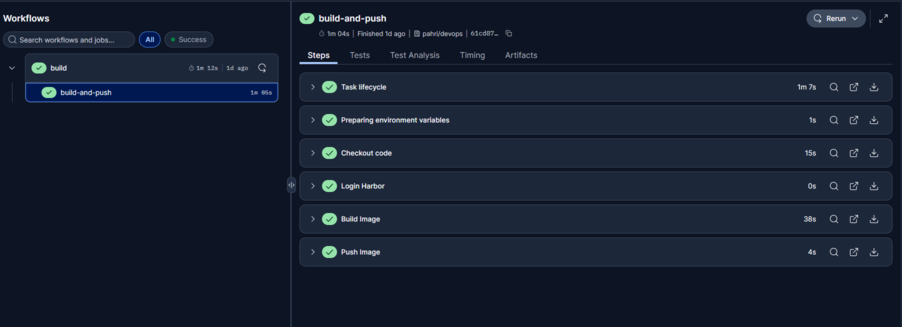
The CircleCI configuration lives in .circleci/config.yml. The configured job uses the custom runner resource class pahri/devops and an Ubuntu machine executor. It checks out the application repository, authenticates with Harbor, builds the image, and pushes it.
Registry credentials are supplied through environment variables rather than committed to Git:
- run:
    name: Login Harbor
    command: |
      echo "$HARBOR_PASSWORD" | docker login \
        "$HARBOR_REGISTRY" \
        -u "$HARBOR_USERNAME" \
        --password-stdin
The image is tagged with CircleCI's $CIRCLE_SHA1, linking the published artifact to the source commit:
- run:
    name: Build Image
    command: |
      IMAGE="$HARBOR_REGISTRY/production/pahri-k8s"
      docker build -t "$IMAGE:$CIRCLE_SHA1" .

- run:
    name: Push Image
    command: |
      IMAGE="$HARBOR_REGISTRY/production/pahri-k8s"
      docker push "$IMAGE:$CIRCLE_SHA1"
The registry address and credentials must be configured in the CircleCI environment. The snippets above show the relevant commands; the complete job also needs its normal CircleCI job and workflow structure.
The image name used by this project is:
harbor.k8s.local/production/pahri-k8s:<commit-sha>
Confirm the artifact in Harbor
Harbor is the private registry for the image that the Kubernetes workload will pull. After CircleCI finishes successfully, confirm that the repository contains the new commit-SHA tag.
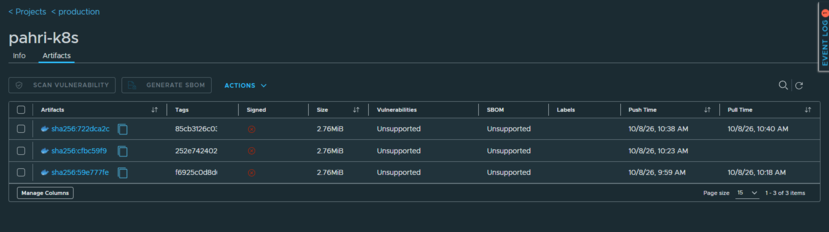
At this stage, the artifact exists in the registry, but the running deployment has not necessarily changed. Kubernetes uses the image reference declared in the GitOps configuration, not simply the most recently pushed image.
Define the workload with Helm
The chart under charts/app/ defines the Kubernetes resources. The production values file declares the desired image, replica count, service port, and resource requests and limits.
replicaCount: 3

image:
  repository: harbor.k8s.local/production/pahri-k8s
  tag: <tag>

service:
  port: 8080

resources:
  requests:
    cpu: 100m
    memory: 128Mi
  limits:
    cpu: 500m
    memory: 512Mi
The replica count expresses the desired number of application replicas. Requests inform scheduling, while limits define the configured CPU and memory ceilings for each container. The Service provides a stable in-cluster endpoint, and the Ingress template defines external HTTP routing when that resource is enabled and configured.
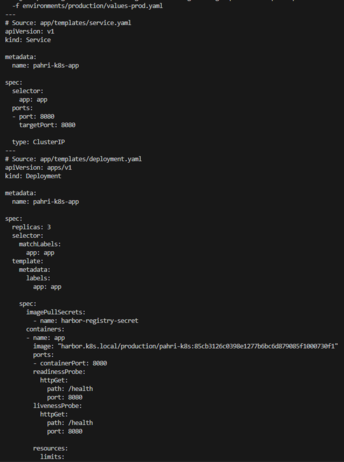
Before synchronizing a change, inspect the rendered manifests from the root of the GitOps repository:
helm template pahri-k8s ./charts/app \
  -f environments/production/values-prod.yaml
Review the rendered image reference, replica count, Service, and resource settings. Rendering the chart lets us inspect the intended resources without applying them to the cluster.
Promote an image by updating the GitOps repository
This step is intentionally manual. CircleCI publishes the image, but it does not edit or commit to the GitOps repository. The operator selects the image version to promote by updating:
environments/production/values-prod.yaml
For example:
image:
  repository: harbor.k8s.local/production/pahri-k8s
  tag: <new-tag>
Use the exact tag that CircleCI pushed successfully. Then commit and push the change:
git add environments/production/values-prod.yaml
git commit -m "Update production application image"
git push
The Git diff records which version is being promoted and preserves that change in the repository history. This is a deliberate control point: a successful image build does not automatically mean that the new image should be deployed.
Synchronize in Argo CD
Argo CD reads the GitOps repository and compares the desired configuration with the live resources. In this project, synchronization is initiated manually rather than automatically.
After pushing the updated values file:
Open the application in Argo CD.
Review the application status and the pending differences.
Confirm that the intended image tag is shown in the desired configuration.
Select Sync to apply the desired state.
Wait for the workload rollout and check the application health.
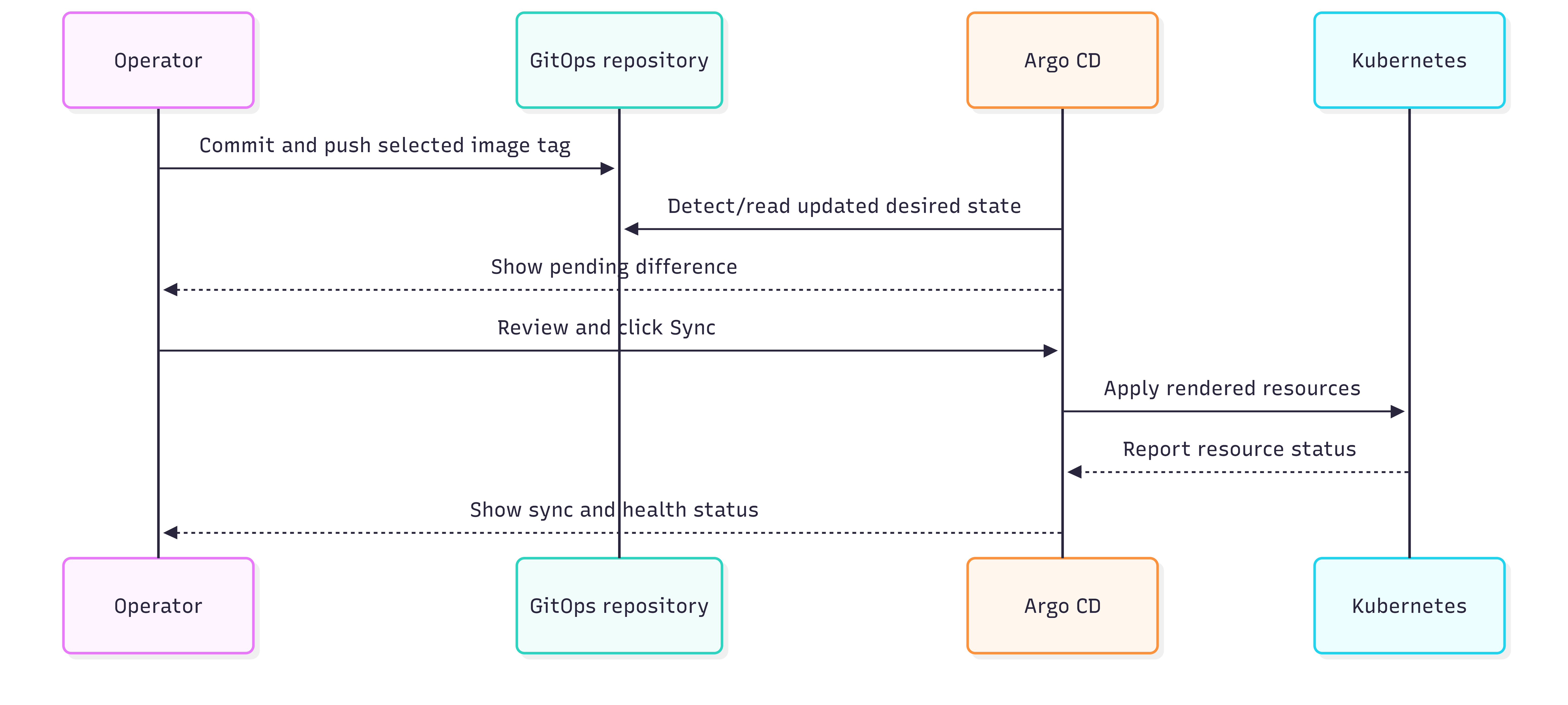
This manual Sync action is separate from the manual Git edit. The Git commit changes the desired state; clicking Sync requests that Argo CD apply it. Keeping both actions explicit provides a clear release decision and avoids suggesting that image publication alone deploys a new version.
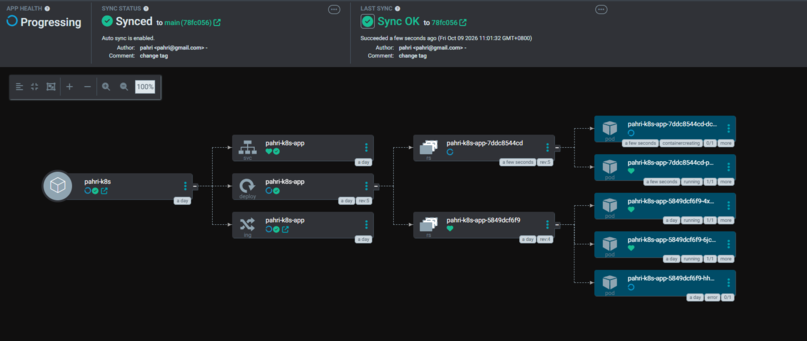
A Synced status indicates that the tracked resources match the desired state Argo CD is using. Health status provides additional information about managed resources, but neither one alone proves that an application endpoint responds correctly.
Verify the deployed release
Verify the deployment at three levels: Kubernetes workload readiness, the image reference, and the application endpoint.
Check the Deployment, Pods, and Service in the namespace:
kubectl get deployment,pods,svc -n pahri-k8s
The Deployment should show the expected number of available replicas, and the Pods should become ready. If they do not, inspect the Pod and recent events:
kubectl describe pod <pod-name> -n pahri-k8s

kubectl get events -n pahri-k8s \
  --sort-by=.metadata.creationTimestamp
Check the image reference on the Deployment:
kubectl get deployment -n pahri-k8s \
  -o jsonpath='{range .items[*]}{.metadata.name}{"\t"}{.spec.template.spec.containers[*].image}{"\n"}{end}'
The image should match the commit-SHA tag in values-prod.yaml.
If the application does not have a reachable Ingress or external endpoint, use port forwarding to test it through the Kubernetes Service:
kubectl port-forward -n pahri-k8s \
  svc/pahri-k8s-app 8080:8080
In another terminal:
curl http://IP:8080/health
Expected response:
{"status":"ok"}
If the application is exposed through Ingress, test that route separately as well. Port-forwarding validates the Service-to-application path, not the full external access path.

The evidence should tell one consistent story: CircleCI published a specific image tag, the GitOps values file declares that tag, the operator manually synchronized it through Argo CD, and Kubernetes is running the declared image while the application responds successfully.
Conclusion
This project demonstrates how Continuous Integration and GitOps can work together to create a deployment workflow that is traceable, predictable, and controlled.
The key design decision is to separate artifact delivery from release promotion. Publishing an image does not automatically make it a production release. Instead, an operator explicitly selects the image version in Git and initiates synchronization through Argo CD. These two control points make release decisions visible, preserve configuration history, and reduce the risk of deploying unreviewed changes.
This approach prioritizes release control and traceability over fully automated deployment.
Ultimately, a reliable deployment workflow is not defined by how many steps it automates, but by how clearly it connects artifacts, configuration, and release decisions. By making these relationships explicit, this project provides a practical foundation for managing Kubernetes deployments with greater confidence and accountability.